Buying team
Requests queue
Every request the floor has sent, for buyers and managers. Unanswered ones come first.
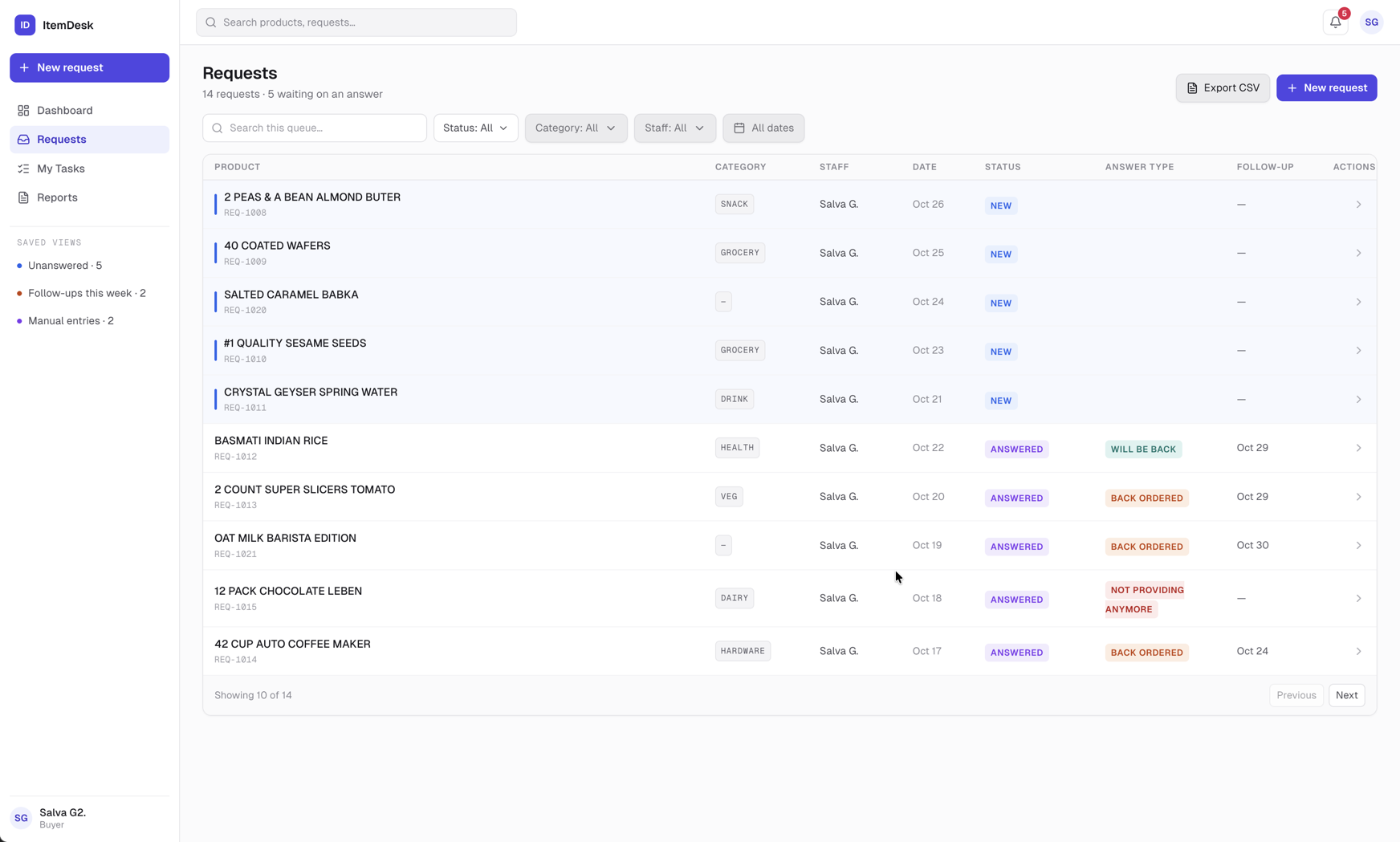
Reading the table
Product and request number, category, who asked, when, status, the kind of answer, and the follow-up date. Requests waiting for an answer are marked with a blue bar and always sort to the top; the rest are newest first. Ten per page. Click a row to open it.
Searching and filtering
- Search — by product name or request number — 1042 and REQ-1042 both work
- Status — tick one or several
- Category / Staff — searchable lists
- Dates — a range of creation dates
- Clear filters — back to the full queue
Tip
Filters live in the page address. Reload and they stay; copy the address to a colleague and they see the same slice of the queue.
Saved views
Three shortcuts in the sidebar, each with a live count. The count always matches what the view lists.
| View | Shows |
|---|---|
| Unanswered | Requests with no answer yet. |
| Follow-ups this week | Back orders whose follow-up date falls within the next seven days, on requests that aren't completed. |
| Manual entries | Requests for products added by hand, not yet completed — the ones that need pricing. |
Export, edit, delete
- Export CSV — downloads every request matching the current filters, not just the page on screen
- Pencil (managers) — edit the question, phone number or call-back flag
- Bin (managers) — delete the request with its answer, tasks and notes — it cannot be undone